


Invitation Maker-Card Creator
4.851.00 Reviews
App Specs
- Version
- 2.1.3
- Updated On
- License
- Free
- Downloads
- 1,000,000+
- Developer
- Battery Stats Saver
- Categories
- Events
- Platform
- Android
Screenshots
 Analysis by AppCompare
I find invitation design easiest when I start with the practical details, not the decorations: who is coming, where they need to go, and what they must know at a glance. That is the lens I bring to Invitation Maker-Card Creator. It is an event-focused app from Battery Stats Saver, aimed at turning an occasion into a shareable card without asking me to begin with a blank canvas. Its appeal is straightforward, but the usefulness of any invitation maker also depends on whether the finished invitation is easy for different people to read and use.
Readability begins before the design looks finished
A template can make a card feel polished quickly, yet a stylish layout is only doing its job if the essential information stands out. When I put an invitation together, I would settle the event name, date, time, location, and any response instructions before spending time on decorative choices. That order is especially helpful on a small phone screen: it reduces the chance that a flourish or image will crowd out the details guests actually need.
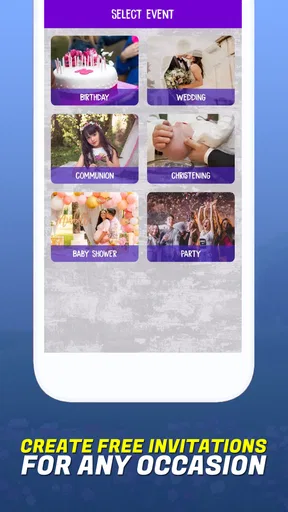
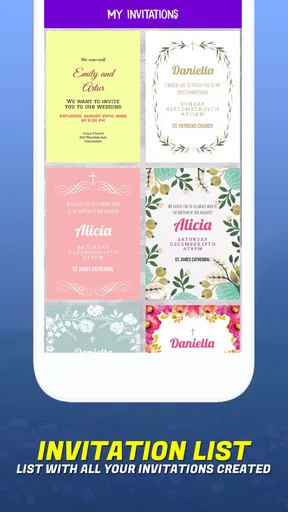
The app’s interface is described through a template-led workflow, with designs arranged by occasion. That can be useful for someone who does not know how to structure a birthday or wedding invitation from scratch. I would still check the finished card at the size recipients are likely to see it, rather than judging it only while zoomed in during editing. A font that looks attractive on a large preview can become tiring to read when the card is viewed in a message thread.
Design choices and different ways of interacting
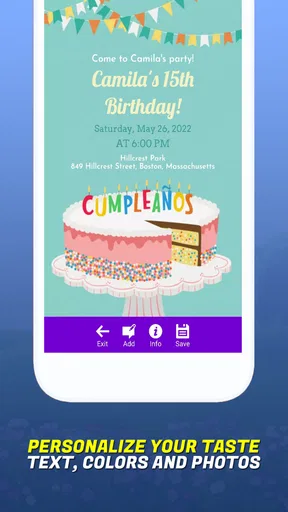
Customization is a strength when it gives people room to make an invitation feel personal, but too many small adjustments can also make editing fiddly. Dragging items into place may feel natural for someone comfortable with touch controls; for anyone with limited fine-motor control, repeated repositioning could be less pleasant than choosing a simpler template and changing only the wording and colors. My practical advice is to treat the template as a useful starting point, not a challenge to decorate every corner.
Color deserves the same restraint. I would avoid relying on color alone to distinguish important information, and I would keep text and background visibly different so the date and venue remain legible. A high-contrast, uncluttered card is often more useful than a more elaborate one, particularly for guests viewing it outdoors, on a dim screen, or while juggling other tasks. These are design choices I can make while composing the invite; they should not be mistaken for a claim that the app has specific accessibility tools or certifications.
When a phone-based invitation is genuinely convenient
The app’s mobile format suits small, time-sensitive jobs: inviting relatives to a birthday dinner, sharing a holiday gathering, or preparing a card while an event is still being organized. I can imagine filling in the core details during a quiet moment, then asking another person to check the wording before sending it. That quick review matters for practical reasons: a mistaken date or an unclear address is much harder to fix after guests have saved or forwarded the invitation.
For a mixed-age guest list, I would not assume every recipient wants the same format. A digital card can be convenient for friends who use messaging or social platforms regularly, while a relative who prefers paper may appreciate a printed copy. Keeping the design simple helps in both situations, because the same information is easier to scan on a screen and on a physical page. If guests need to reply, I would include clear instructions in the invitation rather than expecting the card itself to manage the response process.
Worth Reading Before You Choose

Flipboard Shows What News Apps Must Do Beyond the Feed

Switching to Android Auto Means Rethinking Your Driving Routine

Google Calendar Makes a Crowded Week Easier to Manage

Ludo King Makes the Most of the Minutes Between Plans

Baby Panda World Brings Quick Play to Modern Phones, but Its Game Library Feels Busy

ESPN’s Live Game View Makes Following Close Games Easier
Who may prefer another approach
This is most appealing if the main task is making a visual invitation without learning a full graphic-design program. Someone organizing a casual celebration can likely get more value from a ready-made layout than from building a card element by element. By contrast, if the event requires detailed registration, multiple schedule changes, guest tracking, or coordinated reminders, a dedicated event-planning service is a better fit. A card maker can help communicate the occasion; it should not be treated as a complete system for managing it.
I would also choose another route when precise brand consistency, complex typography, or exact print-production controls matter. A general-purpose design tool may offer more room for that kind of work, though it may ask for more time and design confidence. For a one-off invite, the trade-off can favor speed; for a large formal event where every printed detail must match, checking the final output carefully is worth the extra effort.
Invitation Maker-Card Creator is free to download, with in-app purchases ranging from $0.99 to $99.99 per item. It is rated for Everyone and has a 4.8 average from around 10,000 ratings, alongside more than 1 million installs. Those figures suggest it has found an audience, but they do not tell me whether a particular template or paid item suits my event. I would explore the free options first and decide whether a purchase solves a real need rather than paying simply to have more design choices.
Easy Peasy Design Process
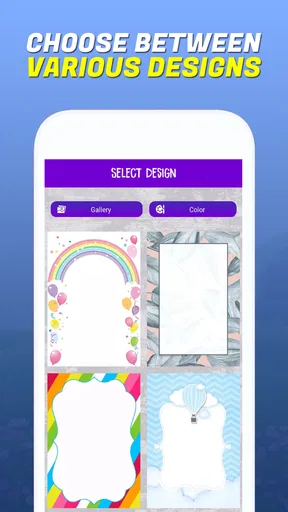
First off, the user interface is super intuitive. Even if you're not the most tech-savvy person, Invitation Maker-Card Creator makes the design process a breeze. You start by choosing from a wide array of templates. Whether it’s a birthday bash, a wedding, or a casual get-together, there’s something for every occasion. The templates are categorized neatly, so you’re not left scrolling endlessly.
Once you pick a template, the customization options are endless. You can tweak colors, fonts, and even add your own images. I particularly loved the drag-and-drop feature that makes arranging elements feel like child’s play. It’s like having a digital canvas where you can unleash your creativity without any restrictions.
Aesthetic Appeal
One thing that caught my eye is how stunning the final products look. The app offers high-resolution designs that can easily be sent digitally or printed without losing quality. There’s an extensive library of stickers and icons that you can sprinkle onto your creation to give it that extra pop. Trust me, your invitees will be impressed.
Convenience at Your Fingertips
What’s great about this app is how it saves time. Gone are the days when you had to hire someone to do this for you or spend countless hours on a computer. With Invitation Maker-Card Creator on your mobile, you can create an invite while waiting for your coffee or during your daily commute. It’s like carrying a mini design studio in your pocket.
Sharing Made Simple
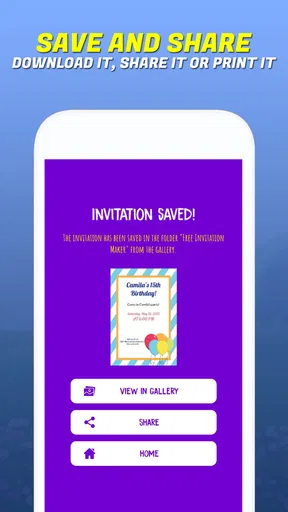
After crafting your masterpiece, sharing it is a snap. The app allows you to send your invites directly via email or social media platforms. If you're old school like me and prefer physical copies, you can also print them out. The app provides a print-ready format, ensuring everything looks just as you designed it.
Room for Improvement
While the app is fantastic, there are a few areas where it could improve. For instance, it would be great to see more integration with popular calendar apps. This would make it easier for invitees to RSVP and mark their calendars directly from the invite. Additionally, while the free version offers plenty of features, some of the premium content is locked behind a paywall. It's worth it if you're frequently making invites, but casual users might find it a bit limiting.
Final Thoughts
All things considered, Invitation Maker-Card Creator is a stellar app for anyone looking to create beautiful, custom invitations with minimal effort. Whether you’re planning a large event or a simple gathering, this app will help your invitations stand out. The convenience, ease of use, and professional-quality results make it a worthy addition to your app collection. Give it a try, and you might just find yourself hosting more events just for the joy of creating those awesome invites!
A sensible workflow for a real event
For a practical example, imagine I am organizing a birthday meal while coordinating with family in different places. I can choose a birthday layout, add the time and address first, then keep the visual extras modest so the message remains clear when forwarded. Before sharing, I would verify the spelling of the location and make sure the date is unmistakable; forwarding is convenient, but it also means an early typo can travel farther than expected.
I would save a clean version of the wording somewhere separate before trying several looks. That small habit makes it easier to return to the right details if I change templates or rethink the colors. It also helps when adapting the same basic information for a printed invitation and a digital one. I would not assume that every recipient will read a social post or email in the same way, so choosing a route that reaches the actual guest list matters as much as the design itself.
Using the design library without overworking the card
Stickers and icons can add warmth, particularly for a casual gathering, but I would use them to support the occasion rather than fill empty space. A useful test is to glance at the card briefly and ask whether the event and its key details register immediately. If the decoration wins that first glance, I would remove an element or two. This is a more reliable approach than assuming that adding more options necessarily improves the invitation.
Templates also create a trade-off: they make it faster to reach a coherent design, but a popular or familiar layout may feel less distinctive. I would personalize one or two visible choices, such as the image or palette, while leaving the overall structure intact. That gives the card a personal touch without turning a quick task into a long editing session. If the event has unusual instructions or several separate activities, though, a single invitation card may not be enough to explain everything neatly.
Sharing, printing, and checking the final result
Before sending a card digitally, I would consider how it will appear in the destination channel. A recipient may see a preview first, so the opening impression should include enough context to make the invitation recognizable. I would also send a test copy to myself or a trusted person when the event is important, checking that the wording is intact and the design remains readable outside the editor. This is a simple safeguard, not an extra feature I expect the app to provide automatically.
For printing, the key decision is whether the design still works on paper at the intended size. I would inspect margins, text legibility, and any image placement before making multiple copies. The app’s print-ready option is convenient for people who want a physical invite, but a polished screen preview is not a substitute for checking the actual output. If exact paper dimensions or professional production requirements are central to the job, a dedicated print workflow may give more control.
Access in different settings
The app’s phone-first convenience can be a real advantage when I have a short gap between errands, but it is less suited to careful editing in a noisy or distracting setting. I would draft the text on the move only if the details are settled, then review the design somewhere I can focus. That reduces the risk of overlooking a small but important item while tapping through customization choices.
For people who find touch editing tiring, choosing a template with a layout close to the desired result can reduce the number of adjustments. Someone who has difficulty distinguishing colors can favor clear text-background contrast and avoid using a color change as the only signal for different sections. For guests with varying reading preferences, plain, direct wording is a better companion to decorative art than a card that depends on visual cues alone. These choices make an invitation more considerate without suggesting that the app itself supplies specialized access features.
What the app does—and does not need to do
Invitation Maker-Card Creator is designed around making a card, which is a narrower job than organizing an event from beginning to end. Its current version is 2.1.3, and it supports devices running Android 8.0 or later. The developer is Battery Stats Saver. I see the focused role as a benefit for a quick design task, but it also explains why people who need guest lists, reminders, or response tracking may be better served by a broader event tool.
It was released on May 4, 2020, and sits in the events category. I would treat its popularity as context rather than a guarantee that it will suit every workflow: a person who makes occasional invitations has different needs from someone coordinating a formal gathering with many moving parts. The best test is whether the templates and editing approach let me produce a clear card without spending more time managing the design than planning the event.
An inclusive choice when clarity comes first
My overall view is that this app is a useful option for people who want a visually finished invitation on a phone and are comfortable making a few design decisions themselves. It is strongest for straightforward occasions, where a template, concise wording, and a quick review can produce something personal without a desktop design program. It is less convincing as the sole tool for complex event logistics, exact print specifications, or guests who need information delivered through several different channels.
I would recommend it to a friend planning a birthday, holiday gathering, or simple celebration who wants a card that feels more considered than a plain text message. I would also remind them to prioritize readable details, check the card in its final sharing or print context, and avoid assuming that a decorative invitation automatically covers RSVP or calendar needs. Used with those limits in mind, Invitation Maker-Card Creator offers a convenient, approachable way to make an event feel welcoming while leaving room for a more inclusive choice of presentation.
Pros
- User-friendly interface for easy navigation.
- Wide variety of templates available.
- Customizable fonts and colors.
- High-quality image export options.
- Supports multiple languages.
Cons
- Limited free features
- requires in-app purchases.
- Occasional app crashes reported.
- Ads can be intrusive at times.
- Some templates are outdated.
- No collaboration features for teams.
FAQs for Invitation Maker-Card Creator
What features does Invitation Maker-Card Creator offer?
Invitation Maker-Card Creator provides a wide range of features, including customizable templates, a variety of fonts, colors, and graphics options, and the ability to add personal photos. Users can design invitations for various events such as weddings, birthdays, and parties, making it versatile and user-friendly.
Is Invitation Maker-Card Creator free to use?
Invitation Maker-Card Creator is free to download and offers basic features at no cost. However, it also provides in-app purchases for access to premium templates and advanced design tools. This allows users to enhance their invitations with additional creative elements.
Can I share my invitations directly from the app?
Yes, the app allows users to easily share their completed invitations via email, social media, or messaging apps. This feature simplifies the process of distributing your invitations, ensuring that they reach your guests quickly and efficiently without needing to leave the app.
Is Invitation Maker-Card Creator available on both Android and iOS?
Invitation Maker-Card Creator is available for both Android and iOS devices. This ensures that users on different platforms can access the app and enjoy its features, making it a versatile tool for anyone looking to create beautiful invitations.
How easy is it to use Invitation Maker-Card Creator for beginners?
The app is designed with a user-friendly interface, making it accessible for beginners. It offers intuitive navigation and step-by-step guidance, allowing users with no prior design experience to create professional-looking invitations with ease. Tutorials and help sections are also readily available for additional support.


